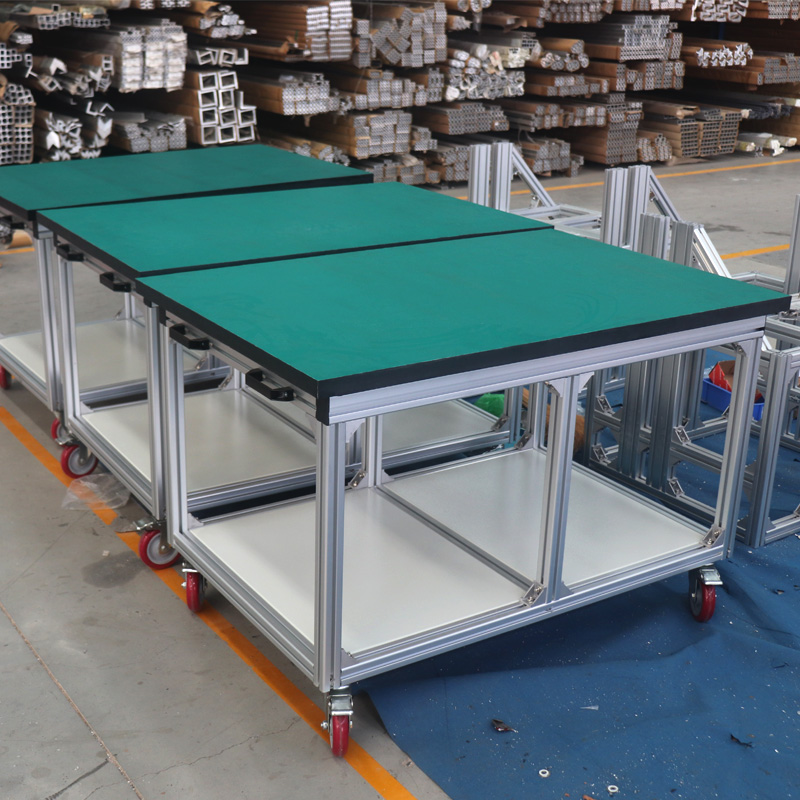
Modern manufacturing faces a silent, expensive threat. Component sensitivity has plummeted to the 100V–200V threshold. Standard tables now act as a severe liability on your factory floor. They destroy yield rates silently and cause undetected field failures. You need structural rigidity combined seamlessly with strict EPA (ESD Protected Area) compliance. Transitioning to a modular Aluminium Workbench solves both problems effectively. This transition directly protects product quality and workstation reliability.
This article provides an engineering-grade blueprint for building your ideal workstation. You will learn exact profile selection methods and structural rigidity techniques. We also cover certified grounding protocols in detail. These steps prevent catastrophic discharge risks. We show you how to protect product yield while scaling operations effortlessly. Let us explore how to engineer a setup tailored exactly to your technical needs.
Key Takeaways
Material Selection Matters: Dissipative surfaces (resistances spanning 1×10⁴ to 1×10¹¹ ohms) are mandatory; purely conductive or insulative materials create catastrophic discharge risks.
Structural Integrity is Behavior-Based: Extruded aluminum requires specific fastener strategies (e.g., anchor fasteners over standard T-nuts) to prevent joint "microslip" and resonance.
Load Rating Dictates Profile: Profile selection (e.g., 30x30 vs. 80x80) must align with load requirements, ranging from <100kg electronic assembly to 400kg+ heavy mechanical inspection.
Grounding requires a strict sequence: A compliant ESD workbench relies on a closed-loop system using a 1-megohm resistor, eliminating unreliable connections like alligator clips.
The Business Case: Why Choose an Aluminium Workbench for Technical Areas?
Ignoring electrostatic discharge controls carries immense operational risk. Substandard workstations create hidden performance problems. Poor ESD control directly causes rising rework pressure. It increases latent defect rates. Customers eventually complain when products fail prematurely in the field. These failures damage brand reputation severely. You must treat technical furniture as an active yield-protection tool.
Engineers often debate framing materials. We must look at the objective differences. Here is how standard options compare for technical environments.
Material Option | Modularity | Durability & ESD Safety | Overall Verdict |
|---|
Aluminium Extrusion | High (T-slot design allows rapid reconfiguration) | Excellent. Anodized layer resists corrosion naturally. Supports strict ESD integration. | Ideal for modern, scalable technical environments. |
Welded Steel | Zero. Requires secondary machining for any changes. | Strong but heavy. Prone to rust if coating chips. | Too rigid for agile manufacturing setups. |
Wood | Low. Screws strip out over time. | Highly insulative. Creates massive ESD hazards. Degrades quickly. | Unsuitable for cleanrooms or sensitive electronics. |
Your workstation must scale with future process needs. T-slot aluminum frames provide unmatched future-proofing. They allow painless integration of new technologies. You can add IoT sensors, overhead lighting, and ergonomic height-adjustability easily. You do this without replacing the core structure. This adaptability makes them especially suitable for long-term technical use.
Sizing and Profile Selection: Matching the Frame to the Workload
Choosing the right extrusion profile is critical. You must evaluate criteria systematically. Consider payload requirements first. Assess vibration tolerance next. Finally, define the exact application. Building a reliable Aluminium Workbench starts by matching the frame directly to the workload.
Use the following profile selection matrix to guide your decision:
Light Duty (20x20 / 30x30 series): These profiles handle loads under 100kg. They provide optimal support for PCB assembly. Use them for simple testing stations and lightweight component inspection.
Medium Duty (40x40 / 45x45 series): This represents the industry standard. These profiles safely support up to 250kg. They work beautifully for versatile manufacturing and mechanical assembly tasks.
Heavy Duty (80x80 series): Industrial workloads demand this size. Heavy tooling requires massive structural support. Use this series for dynamic forces and payloads exceeding 400kg.
You must balance strength against cost. Over-specifying profiles increases material costs unnecessarily. It wastes budget on unneeded bulk. Under-specifying creates dangerous instability. Thin frames lead to table sway. This constant movement causes operator fatigue. It also introduces errors during high-precision inspection tasks. Always align your series choice strictly to your payload data.
Engineering the Frame: Overcoming Rigidity and Microslip Challenges
Aluminum yields differently than steel. You must acknowledge this reality during the design phase. Rigidity comes from establishing "closed load paths." It does not come merely from profile girth. You must minimize unsupported spans. Long, unbraced extrusions will bow under moderate pressure.
Many builders face the pitfall of structural shifting. We call this phenomenon "microslip." Pure bolt torque cannot fix poor assembly logic. Extrusions flex slightly during use. Over time, standard connections loosen. You must implement a strict fastener selection strategy.
Here are proven best practices for structural integrity:
Avoid Drop-in T-nuts for Key Joints: Never rely solely on drop-in T-nuts for load-bearing 90-degree junctions. They lack the surface area to prevent shear movement.
Use Anchor Fasteners: We recommend anchor fasteners for structural corners. Pair them with anti-loosening lock washers. Nord-Lock washers work exceptionally well. They achieve self-aligning, vibration-resistant connections.
Install Corner Gussets: High-stress junctions need external support. Specify corner gussets at these intersections. They maintain squareness and prevent torsional twist effectively.
You must also manage resonance. A highly constrained aluminum structure acts like a tuning fork. It can "ring" or vibrate under mechanical work. Mitigate this issue properly. Recommend leveling feet featuring vibration-dampening rubber bases. These bases absorb excess kinetic energy quietly.
Configuring the EPA: Essential ESD Materials and Grounding
Protecting sensitive components requires understanding material physics. You must define the compliance barrier clearly. The surface resistance determines whether a bench is safe or dangerous.
Material Type | Resistance Range (Ohms) | ESD Behavior & Risk Level |
|---|
Insulative | > 1011 | Traps charge completely. Strictly forbid standard plastics and styrofoam. Extreme risk. |
Conductive | < 104 | Discharges energy too rapidly. Creates spark risks and Electrical Overstress (EOS). |
Dissipative | 104 to 1011 | The required standard. Allows safe, controlled charge dissipation into the ground. |
You must build a comprehensive ESD Bill of Materials (BOM). A compliant setup requires several integrated components. First, source a static-dissipative vinyl or rubber table mat. Next, procure an Earth Bonding Point (EBP) bar. Mount this bar securely beneath the bench rim. Supply wrist strap kits for seated operators. Finally, provide ESD floor mats and heel grounders for mobile or standing operators.
Connection imperatives dictate safety. All ground connections must include a 1-megohm safety resistor. This resistor links directly to the facility ground. It protects human operators from accidental electrocution. Warn your team against temporary fixes. Never use alligator clips for ESD grounding. They slip off easily. Mandate metal snaps or secure banana plugs. They guarantee stable, unbroken resistance.
Step-by-Step Installation Protocol for ESD Workstations
Implementation sequencing prevents costly rework. You must follow a logical assembly order. Rushing the process guarantees structural or electrical failures.
Frame Assembly: Build the structure from the bottom up. Secure your leveling feet first. Ensure the base is level before tightening upper cross-members. This prevents permanent frame warping.
Surface Application: Lay the dissipative matting carefully. Ensure it lies perfectly flat. Bubbles or ridges cause tripping. They also allow delicate components to roll off the edge.
Grounding Wiring: Connect the table mat ground wire properly. Route it to the facility ground via the EBP plug. Keep wiring tidy to avoid accidental snags.
Operator Integration: Attach the grounding block (EBP Bar). Fasten it to the front edge of the frame. This ensures easy wrist-strap access for operators.
Floor Setup: Roll out the conductive floor mat. Attach its dedicated ground wire securely. Place it exactly where operators stand or walk most frequently.
Verification is the final mandatory step. Never assume your connections work perfectly. Test the completed loop thoroughly. Use an ohm-meter or surface resistivity meter. Conduct these tests prior to official commissioning. Ensure all readings fall within the safe dissipative range.
Maintenance, Compliance Audits, and Long-Term Protection
Building the station is only the beginning. You must preserve the dissipative layer diligently. Standard industrial cleaners ruin anti-static properties. They strip away the chemical layer that controls resistance. Mandate specialized ESD surface cleaners for daily wipe-downs. Train cleaning staff on these strict requirements.
Implement quarterly hardware audits. Aluminum structures require occasional tightening. Establish a strict 90-day maintenance schedule. Visually inspect all T-slot tracks for debris buildup. Verify the torque on anchor fasteners and gussets. A single loose bolt can compromise frame rigidity.
Enforce daily compliance checks rigorously. Human behavior poses the biggest ESD risk. Implement mandatory pre-shift testing protocols. Use wall-mounted wrist-strap and footwear test stations. Operators must verify their personal grounding before touching any component. This ensures the human-to-ground loop remains unbroken at all times.
Conclusion
Building an effective workstation demands careful engineering. It requires balancing structural physics with strict electrical compliance. Proper fasteners prevent frame degradation. Correct profile series handle your specific payloads safely. Dissipative materials protect your highly sensitive components. Hard-wired grounding protects your operators.
Always match your aluminum profile size directly to your maximum expected payload.
Eliminate structural microslip by upgrading to anchor fasteners and anti-loosening washers.
Source only verified dissipative surface materials to prevent sudden static discharge.
Enforce strict maintenance schedules and daily operator testing protocols.
Take action today to protect your production lines. Evaluate your current payload requirements thoroughly. Download a certified ESD setup checklist to audit your facility. Consult a specialized hardware engineer to map out your custom profile extrusion BOM. Stop risking valuable inventory on substandard furniture.
FAQ
Q: Can I use a standard metal desk as an ESD workbench?
A: No. Standard metal desks are highly conductive. They present an extreme danger to sensitive components. If a charged device touches bare metal, the charge dumps instantly. This rapid discharge causes destructive sparks and Electrical Overstress (EOS). You must use a dissipative surface connected via a 1-megohm resistor.
Q: Which aluminium profile series is best for an electronics workbench?
A: It depends on your tooling weight. For basic PCB assembly and lightweight tasks, the 30x30 series works perfectly. If your process involves heavy testing fixtures or mechanical presses, transition to the 40x40 series. The 40x40 profile provides the ideal balance of cost and structural rigidity.
Q: How often should I test the grounding on my aluminium workbench?
A: You should test wrist straps and footwear daily before shifts begin. For the physical workbench surface, perform a surface resistivity audit quarterly. Check all grounding cables, EBP bars, and mat connections. Use a calibrated ohm-meter to ensure resistance remains within the safe dissipative range.
Q: Why use anchor fasteners instead of T-nuts for workbench frames?
A: Standard T-nuts often cause structural shifting known as "microslip." They lack sufficient clamping force for load-bearing 90-degree joints. Anchor fasteners provide superior vibration resistance. When paired with lock washers, they actively pull the extrusions together. This alignment eliminates sway and strengthens the overall frame rigidity.